Set up an agent
An agent is another company that handles a pickup or a delivery for you — typically at the far end of a job you cannot cover yourself. This is where they are set up, and where what they charge is recorded.
Before you start
Section titled “Before you start”Have their contact details and the commercial terms to hand. It is worth knowing which airports they cover before you start, because rates are entered per airport and vehicle size on a second tab.
- Go to .
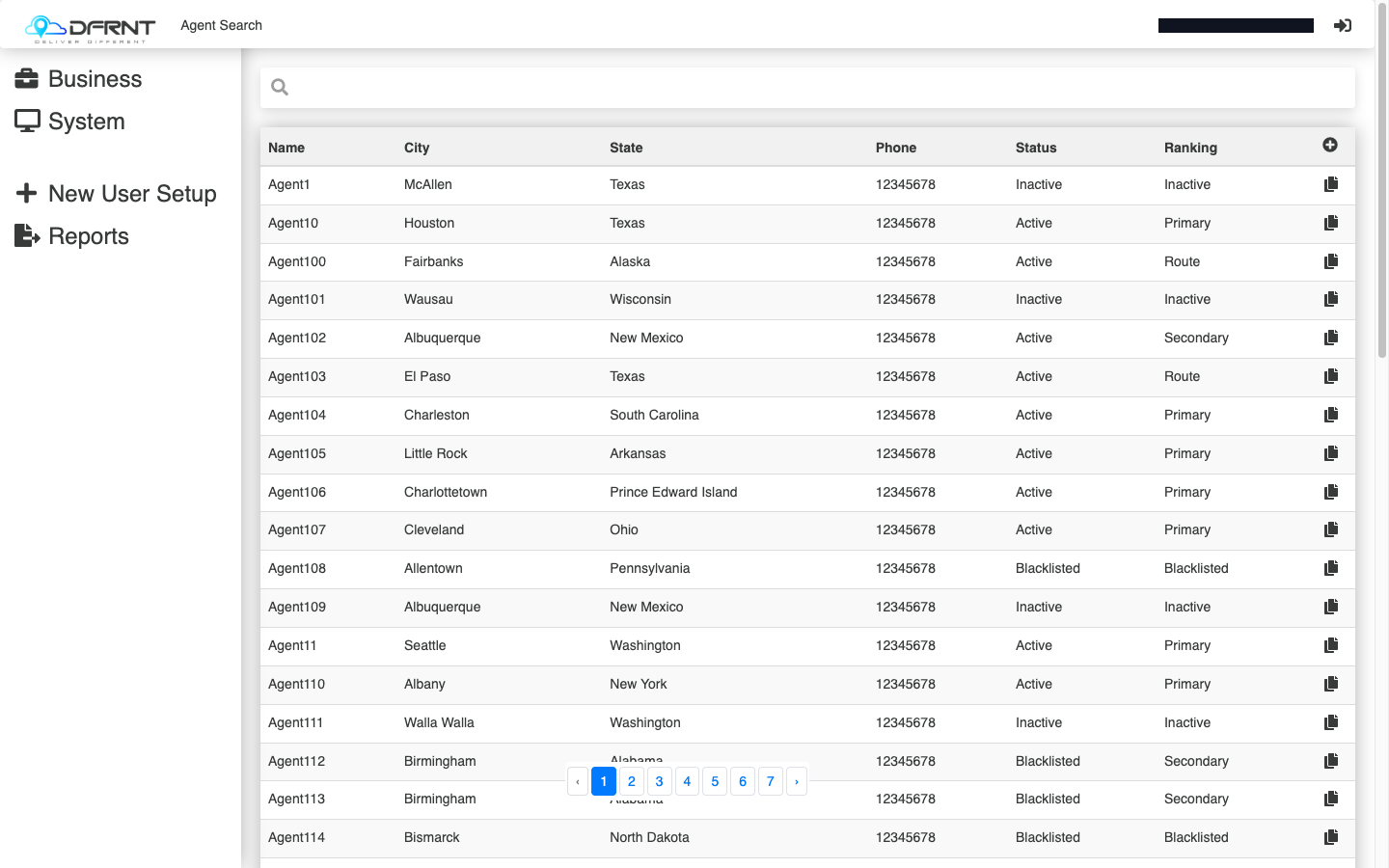
- Find the agent and click the row, or use the + control to add one. The per-row copy control starts a new agent from an existing one.
- Fill in the General tab:
- Name, Address, City, Postcode, State — who and where they are. The GPS link shows the pin that address resolves to, which is worth a glance for a depot on a large site.
- Phone, Alt Phone, Booking Email, Alt Email — how work reaches them. The booking email is the one quote requests and job assignments go to.
- Status — Active, Inactive, or Blacklisted.
- Ranking — Primary, Secondary, Route, Inactive or Blacklisted.
- Notes — anything the next person needs to know.
- Press SAVE.
Rates per airport
Section titled “Rates per airport”The Agent Vehicles tab is where an agent’s rates are recorded properly: one row per airport and vehicle size, each carrying a Distance Rate, Base Charge, Distance Included, Per Distance Unit, Extra Charge and a Zone Rate Card.
That shape is why an agent covering three airports with two vehicle sizes needs six rows. Add them through Edit Agent Vehicles on that tab.
Good to know
Section titled “Good to know”Status and Ranking are two different questions — one is whether you deal with this agent at all, the other is where they sit in the pecking order when more than one could do the job. Both are on the list screen, so you can see the whole picture without opening records.
Blacklisting is available as a status and as a ranking. If you are taking an agent out of use, set the Status; that is the field that reads as a decision rather than a preference.
If something goes wrong
Section titled “If something goes wrong”An agent is not offered on a job. Check Status first, then whether the agent has an Agent Vehicles row for that airport and vehicle size.
The price coming back is not what you agreed. Look at the Agent Vehicles row for that airport and vehicle size.
Related
Section titled “Related”- Airports and the flight pickup buffer
- The Domestic screen — where agents are assigned to jobs
- Admin Manager overview
Internal: how this page was verified draft
- Checked by
- kenneth on 2026-09-24
- How
- ui-walkthrough
- Where
- staging · dfrnt-shared · logged in as internal-staff
- Against
- ui: re-walked 2026-09-24 on the baseline (DFRNT shared staging — DFRNT organisation confirmed in the org switcher; internal-staff session; read-only) — Agent Search columns Name, City, State, Phone, Status, Ranking; a record has General / Agent Vehicles / Edited; General fields Name, Address, City, Postcode, State, GPS (View), Phone, Alt Phone, Booking Email, Alt Email, Status (Active, Blacklisted, Inactive), Ranking (Blacklisted, Inactive, Primary, Route, Secondary), Notes — NO Base Rates block on this build; Agent Vehicles has the eight columns behind Edit Agent Vehicles
- ui: Admin Manager > Business > Agents, walked 2026-09-01 — search screen columns are Name, City, State, Phone, Status, Ranking, with an add control and per-row copy
- ui: an agent record, opened 2026-09-01 — tabs General / Agent Vehicles / Edited; General fields Name, Address, City, Postcode, State, GPS (View), Phone, Alt Phone, Booking Email, Alt Email, Status, Ranking, Notes, and a 'Base Rates (Excluding Margin and GST)' block with Flagfall, KM Rate, Item Rate and Max Kms
- ui: Status offers Active, Blacklisted, Inactive; Ranking offers Primary, Secondary, Route, Inactive, Blacklisted
- ui: the Agent Vehicles tab, opened 2026-09-01 — a table with columns Airport, Vehicle Size, Distance Rate, Base Charge, Distance Included, Per Distance Unit, Extra Charge, Zone Rate Card, behind an 'Edit Agent Vehicles' control
- Likely to change
- high — Reached through the older menus, which are being phased out, and agents are read by the flight and multi-leg work that is under active development.
- Re-check by
- 2026-10-15
- Config-dependent
- 2 item(s) called out on this page
- Screenshots
- 1 still to capture
- Open questions
- How Status and Ranking combine when work is offered — whether Ranking orders the choices, Status filters them, or both, and what Route means as distinct from Primary and Secondary.
- A 'Base Rates (Excluding Margin and GST)' block — Flagfall, KM Rate, Item Rate, Max Kms — was on the General tab on a previous build (2026-09-01) but is absent on the baseline (2026-09-24). What switches it on, and whether it is a fallback for airports with no Agent Vehicles row.
- Whether the Agent Vehicles rate fields are editable here or only on the Rates screen — the retiring help docs say they are read-only on this page, which was not confirmed.
- What Zone Rate Card selects, and where those cards are maintained.
- Create and save were not exercised (read-only walk).