Set up public holidays
The holiday calendar. Each entry says what happens on a public holiday — whether it can be booked, what surcharge applies, and for which part of the operation.
Before you start
Section titled “Before you start”Look at how existing holidays are entered before adding one, and follow the same pattern. A holiday may be a single row, or one row per site and entry type — match what your company already does.
- Go to .
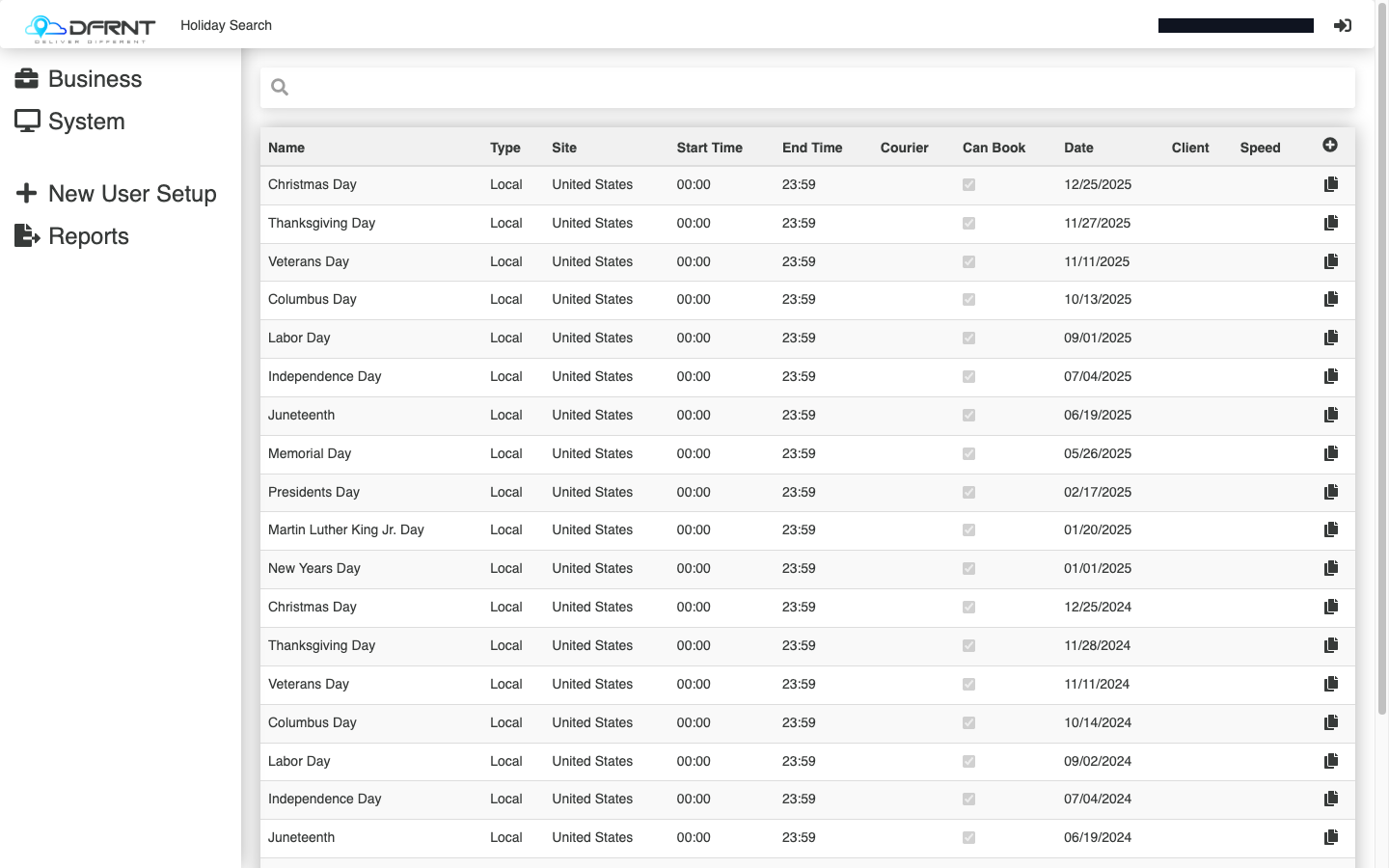
- Click an existing holiday to change it, or use the + control to add a new one.
- Fill in the form:
- Name — e.g. the holiday’s name and year, matching the rows around it.
- Site — which part of the operation the row applies to.
- Job Entry Type — Local or Nationwide.
- Date, Start Time, End Time — when it applies; existing rows run the whole day.
- Amount — the surcharge figure (see the open questions on this page before promising a customer what it does).
- Can Book — whether booking is allowed on the day.
- Message — text shown to customers about the holiday.
- Notes — internal notes.
- Client, All Services / Service — narrow the row to one customer or one service instead of everyone.
- Press SAVE.
- If the holiday needs rows for other sites or entry types, repeat for each, following the existing pattern.
Good to know
Section titled “Good to know”The search grid shows every row’s Type, Site, Can Book and Date at a glance, so the fastest sanity check after entering a holiday is to search its name and confirm the set of rows matches an equivalent past holiday.
If something goes wrong
Section titled “If something goes wrong”A holiday only half-applies — surcharged in one city but not another, or on some services only. Almost always a missing row: compare the rows for that holiday against a past one.
You need to change every row of a holiday. There is no bulk edit on this screen — open each row.
Related
Section titled “Related”- Admin Manager overview
- Set up a recurring booking — recurring bookings have their own holiday behaviour setting
Internal: how this page was verified draft
- Checked by
- kenneth on 2026-09-24
- How
- ui-walkthrough
- Where
- staging · dfrnt-shared · logged in as internal-staff
- Against
- ui: re-walked 2026-09-24 on the baseline (DFRNT shared staging — DFRNT organisation confirmed in the org switcher; internal-staff session; read-only) — Holiday Search columns match; the list holds one row per public holiday, a single Site ("United States"), all of type Local, Courier and Client empty; the form fields match (Name, Site, Job Entry Type Local/Nationwide, Date, Start Time, End Time, Courier, Amount, Can Book, Message, Notes, Client)
- ui: Admin Manager > Business > Holidays, walked 2026-09-01 — search grid columns are Name, Type, Site, Start Time, End Time, Courier, Can Book, Date, Client, Speed; live data shows each public holiday entered as several rows (per site, and as Local and Nationwide types)
- ui: the holiday form, read 2026-09-01 — fields Name, Site, Job Entry Type (Local / Nationwide), Date, Start Time, End Time, Courier, Amount, Can Book, Message, Notes, Client, All Services, Service; tabs General / Edited; CANCEL / SAVE
- Likely to change
- high — The screen is calendar maintenance with no change signal of its own, but it is reached through the older menus, which are being phased out — the path on this page is expected to move.
- Re-check by
- 2026-10-15
- Config-dependent
- 2 item(s) called out on this page
- Screenshots
- 1 still to capture
- Open questions
- What Amount is measured in — a flat figure or a percentage — and where the surcharge lands (job price, invoice line, or both).
- What Can Book does exactly when unticked — the retiring help docs say it stops customers booking on the day; not yet observed.
- Where the Message text appears to a customer.
- What choosing a Courier on a holiday row does — rows in live data carry one, so the field is in use, but its effect was not traced.
- How Local differs from Nationwide in effect, and why holidays are entered as both.
- Whether the Speed column on the search grid and the Service field on the form are the same thing under two names.