The Domestic screen
Most jobs live on the main Dispatch board. The ones that travel further — on a flight, or handed to an agent for pickup or delivery at the far end — are worked here instead, on their own dashboard.
Open it from the Dispatch page menu: .
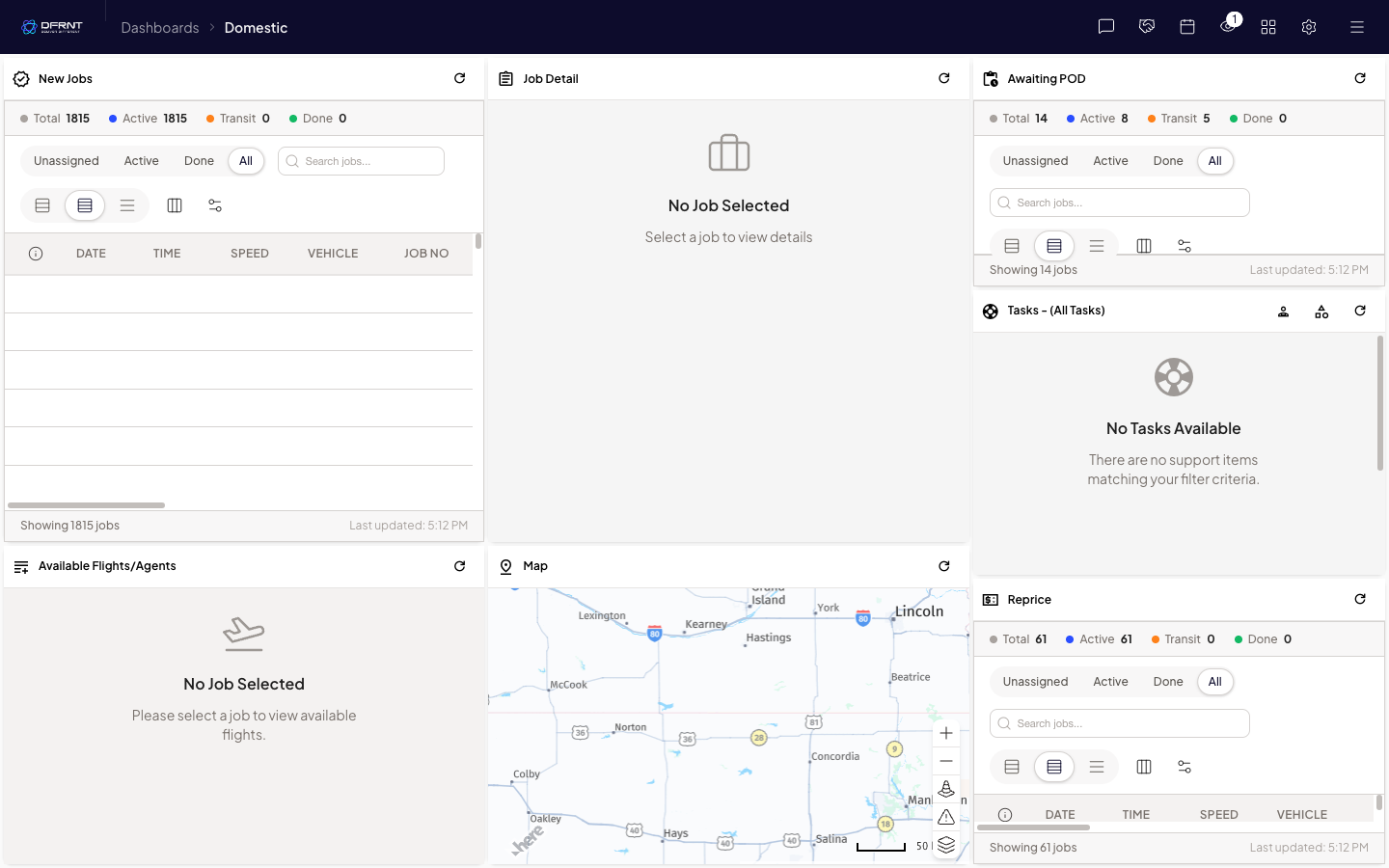
The panes
Section titled “The panes”New Jobs — arrivals that need something done: a flight chosen, or an agent assigned. Like the main board’s job list, it has its own counters, filters and search.
Job Detail — the selected job. Empty until you pick one.
Available Flights/Agents — what the selected job can be put on. It sits empty with “Please select a job to view available flights” until a job is chosen.
Awaiting POD — jobs that are on their way and waiting for proof of delivery.
Tasks — the task list, scoped to this screen’s jobs or all tasks.
Reprice — jobs flagged for a price check.
Map — where the selected work is.
What the guides will cover
Section titled “What the guides will cover”The step-by-step guides for this screen — assigning a flight or an agent, requesting agent quotes, repricing, and completing a job with a POD name and time — are planned and will be written from a session with live jobs in the queue. Until then, this page is the map of the screen, not the manual for it.
Related
Section titled “Related”- Dispatch — the main board, and how to reach this screen
Internal: how this page was verified draft
- Checked by
- kenneth on 2026-09-24
- How
- ui-walkthrough
- Where
- staging · dfrnt-shared · logged in as internal-staff
- Against
- ui: re-walked 2026-09-24 on the baseline (DFRNT shared staging — DFRNT organisation confirmed in the org switcher; internal-staff session; read-only) — Dispatch menu > Domestic; breadcrumb reads 'Dashboards > Domestic'; route #!/Nationwide; panes New Jobs, Job Detail, Awaiting POD, Tasks - (All Tasks), Available Flights/Agents, Map, Reprice with the same counters, filters and empty-state text; the queue held test jobs. Page renamed from 'The Nationwide screen' on Kenneth's decision 2026-09-24 — the baseline's label is Domestic (task_id kept, it is the export join key)
- ui: Dispatch menu > Nationwide, walked 2026-09-01 — breadcrumb reads 'Dashboards > Nationwide'
- ui: panes read on screen — New Jobs, Job Detail, Awaiting POD, Tasks - (All Tasks), Available Flights/Agents, Map, Reprice; each list pane carries its own Total/Active/Transit/Done counters, Unassigned/Active/Done/All filters, a job search box and layout controls
- ui: empty-state text — the Available Flights/Agents pane reads 'No Job Selected — Please select a job to view available flights'; the queue held no jobs during the walk, so no flow was exercised
- Likely to change
- high — Part of the rebuilt BETA Dispatch, and the surface most touched by current flight-work development. The retiring help docs describe an older version of this screen, with a pane this one did not show. The menu label has differed between builds (Nationwide on one, Domestic on the baseline).
- Re-check by
- 2026-10-01
- Config-dependent
- 1 item(s) called out on this page
- Open questions
- The working flows — assigning a flight or agent to a job, requesting an agent quote, repricing a leg, and completing a job with a POD name and time — need a walk with real jobs in the queue. The retiring help docs describe all four on the older version of this screen; none has been exercised on this one.
- Whether an 'Action Required' area exists for delayed or cancelled flights — the older screen had one; this walk (with an empty queue) did not show it.
- How multi-leg jobs are structured on screen — the older docs describe a chargeable parent job with child legs, where repricing a child updates the parent; unconfirmed here.
- What decides that a job lands on this screen rather than the main board.